Showing posts with label Silent Movie. Show all posts
Showing posts with label Silent Movie. Show all posts
Thursday, 2 February 2012

Wednesday, 1 February 2012
Tuesday, 24 January 2012
Saturday, 14 January 2012
Second Sequence / / AfterEffects

On a lighter note, I enjoy this colour scheme. - Taking advantage of RGB colour mode.
Pace of disappearing type is Irratic so works well with disperse / / subject matter.

A slight improvement. By manipulating the opacity and blur, 'disperse' is more clearly communicated.
My plan for this sequence is to touch up as and when / / if time allows / / if my other sequences are just as not so great. However, for now, my final sequence:
Monday, 2 January 2012
First Sequence / / After Effects
To give the effect:

The idea is that the type is being pulled back on an axis, coming forward with force and then hitting the screen.
I also wanted the type and background to change colour when it 'hit the screen'. For this I had to create a solid layer of black for the background.
From this I wanted to have a bounce back, vibration movement so I copied the type layer twice and created differenciating opacity key frames. Like so:

Next I needed to start thinking about how i'd be tackling the type actually dispersing.
This is what i've come up with so far:
Thursday, 8 December 2011
Timeline Storyboard.
The session /-
What I know of a key frame is that it either depicts a soecifically important aspect within a storyboard, or shows what each frame will look like sequentially at even points- a smooth transition. The first point is the one I usually go by. It gives an idea of pace, whilst actually showing 'key' points where something happens. However, definitions say otherwise:
- A 'key frame', outside of After Effects is known as A video frame containing all the data needed to construct an image without reference to previous frames.
- Potential problems? From the session I found that it is extremely hard to work out timing with a difficult number. For example, the length of the kinetic type video I was working with was 32 seconds. This was very difficult to achieve without making my head hurt a lot. To avoid this in the future I plan on working with only easy numbers i.e. multiples of 10, so that dividing is easier.
- Important information you need to know when designing timelines:
- length of the video.
-
Refined five ideas,
What I know of a key frame is that it either depicts a soecifically important aspect within a storyboard, or shows what each frame will look like sequentially at even points- a smooth transition. The first point is the one I usually go by. It gives an idea of pace, whilst actually showing 'key' points where something happens. However, definitions say otherwise:
- A 'key frame', outside of After Effects is known as A video frame containing all the data needed to construct an image without reference to previous frames.
- Potential problems? From the session I found that it is extremely hard to work out timing with a difficult number. For example, the length of the kinetic type video I was working with was 32 seconds. This was very difficult to achieve without making my head hurt a lot. To avoid this in the future I plan on working with only easy numbers i.e. multiples of 10, so that dividing is easier.
- Important information you need to know when designing timelines:
- length of the video.
-
Refined five ideas,
Storyboard timelines depicting the desired pace of my design.
The task was to chose five of the best ideas from the twentyfive we had designed, then adapt this into real time- timeline it.

The task was to chose five of the best ideas from the twentyfive we had designed, then adapt this into real time- timeline it.

First of all, because I now know what perspectives and movement I want to achieve, I need to find out the specific times of each movement.
This video is as close to the kind of pace I am aiming to achieve without designing anything on AfterEffects. So, this makes working out my key frames much easier on paper.


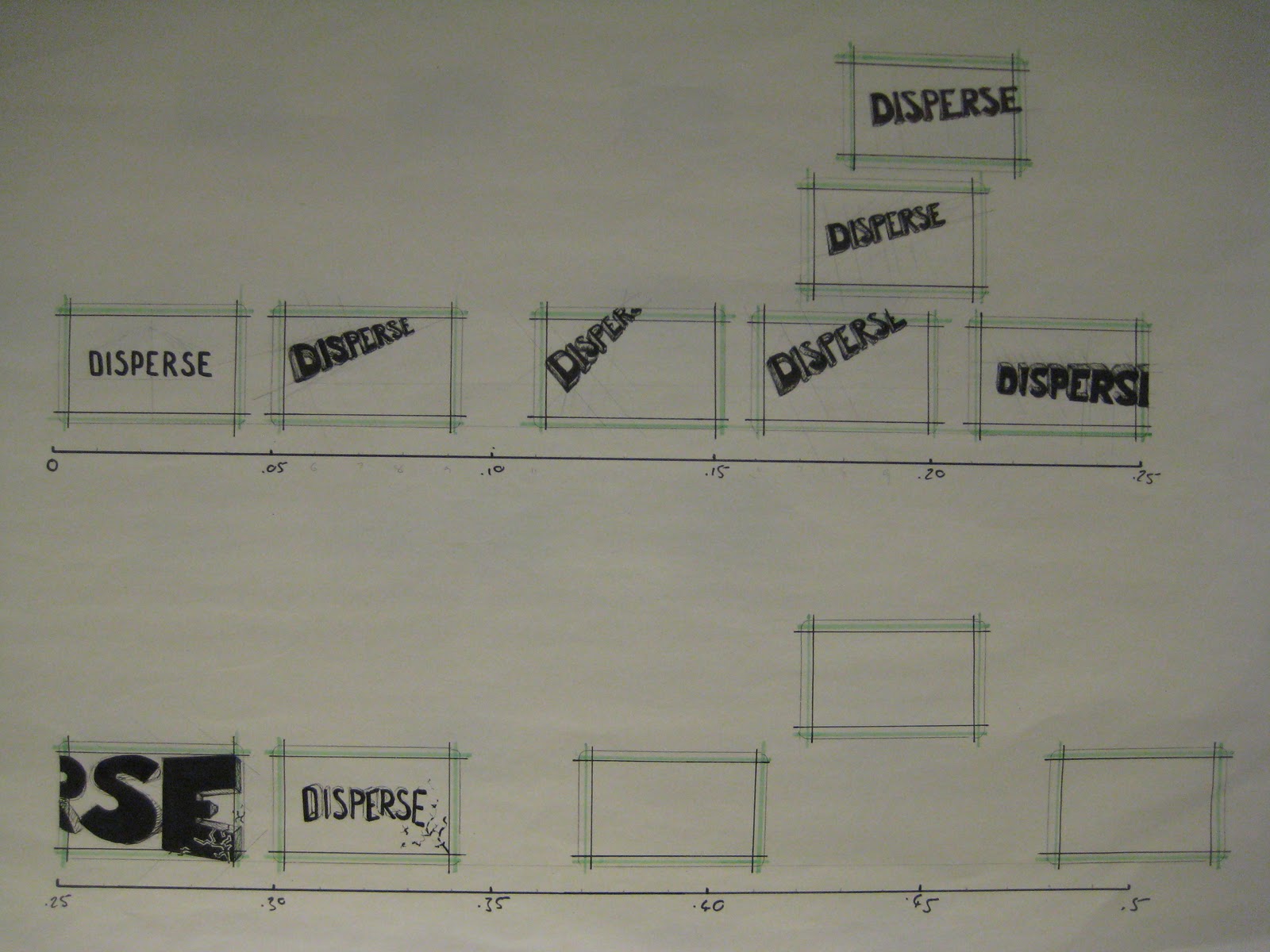


The image above shows how I have gone further from 5 key frames within five seconds. This has helped me look at the transitional points within the sequence. And will hopefully make it easier for me to design when it comes to After Effects.
Wednesday, 7 December 2011
Storyboards: Pace / Key Frames


To begin with, I thought it would be a good idea to gauge pace of my own designs through an entirely new timeline.

Below are the storyboards with pace i've designed. They do not take into consideration real time. I have just used curved/ straight lines to depict whether the pace is slow or fast. This was before we had our timeline induction. Before thinking about actual time I tried to show it through these arrows. From the crit with Loraine I was told I needed to inform pace in a more effective way. I think timelines are the perfect way to depict time.


Tuesday, 29 November 2011
Preliminary Research
Research into two words their connotations/ meanings/ readings etc.
Researching into these words will enable me to engage fully in Thursdays workshop and come up with some good ideas before designing in AfterEffects.
First of all:
Words associated with Disperse:


Words associated with Float:


Subscribe to:
Posts (Atom)